CybersecurityScam warning
Fake Google Drive “last warning” page opens in Chrome on Android — do not tap the button
A page at a look-alike address threatens that files will be lost within 30 minutes unless you upgrade your storage. It is not Google. Here is what we saw and what to do.
Why it matters
The page is built to make people act before they think: a trusted logo, a threat to personal files and a clock that is running. Anyone who uses Google Drive or Google Photos can be hit by it, and it appeared without a click.
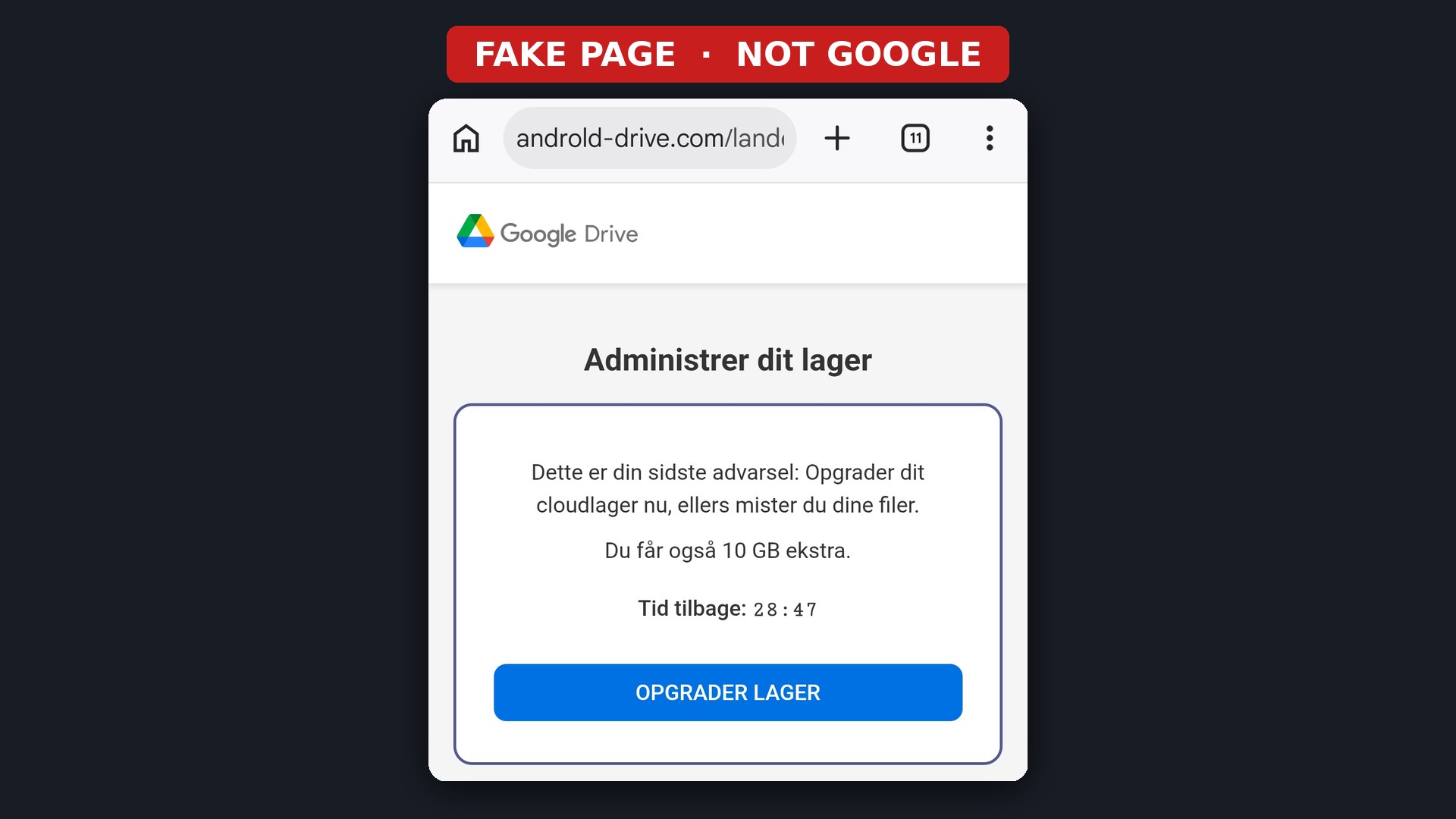
A fake Google Drive page is being shown to Chrome users on Android. It appeared on the phone of a member of the Weekly Future team in Copenhagen on Thursday 19 November at about 06:40 local time, when Chrome was opened as usual. No address had been typed and no advert had been tapped.
The page shows the Google Drive logo under the heading “Manage your storage” and, in the Danish version we saw, the text: “This is your last warning: Upgrade your cloud storage now, or you will lose your files.” It adds that the user also gets 10 GB extra. Below that, a countdown starts at about 30 minutes, followed by a large blue button marked “Upgrade storage”.
How to tell it is fake
- The address is androld-drive[.]com/landers/… — not a Google address. The name is spelled with a lowercase L in place of the i in “android”, which is easy to miss on a small screen.
- Google does not give users a 30-minute deadline in a browser tab. Storage messages from Google are shown inside its own apps and account pages.
- The threat is wrong on the facts. According to BleepingComputer, Google says that when a storage plan ends, the user loses access to the extra storage, and files are only deleted after two years.
- A countdown, a “last warning” and a bonus offer in the same box are pressure tactics, not account notices.
What we do not know
We did not press the button, so we cannot say what lies behind this particular page. We also do not know how the phone was sent there — it may have been an earlier browser tab, an advertising network on another site or something else. The page was in Danish, which suggests the text is adapted to the visitor's language or location.
The pattern is known. BleepingComputer reported in January on a months-long campaign of fake cloud-storage warnings whose “upgrade” buttons led to affiliate pages for unrelated products and to checkout forms that collect card details. Malwarebytes followed one such chain in February and concluded that the operators appeared to earn affiliate payments from the traffic rather than steal passwords directly. The German fact-checking site Mimikama warned in April about a Google Drive storage alert with an upgrade trap. Those campaigns mostly arrived by email or as banners; the page we saw opened directly in the browser.
What to do
- Close the tab. Do not tap the button and do not enter card details, passwords or other personal information.
- Check your real storage in the Google Drive or Google One app, or type one.google.com/storage into the address bar yourself.
- In Chrome on Android, open Settings → Site settings and look at Notifications and at Pop-ups and redirects. Remove any site you do not recognise.
- If you have already entered card details, contact your bank or card issuer straight away and have the card blocked.
- Report the page to Google at safebrowsing.google.com/safebrowsing/report_phish/ so that Chrome can warn other users.
Have you seen the same page, in Danish or another language? Tell us which address it used and how it appeared. We will update this story if we learn more about where it comes from.
Sources
Written with AI assistance from the sources listed above. Its facts were checked against those sources and the article was proofread before publication. How we work